vue2_기본정리
| topics | |
| types | 학습 |
| tags |
#vue #vue2 #mvvm
|
Vue 2 기본 정리
MVVM 패턴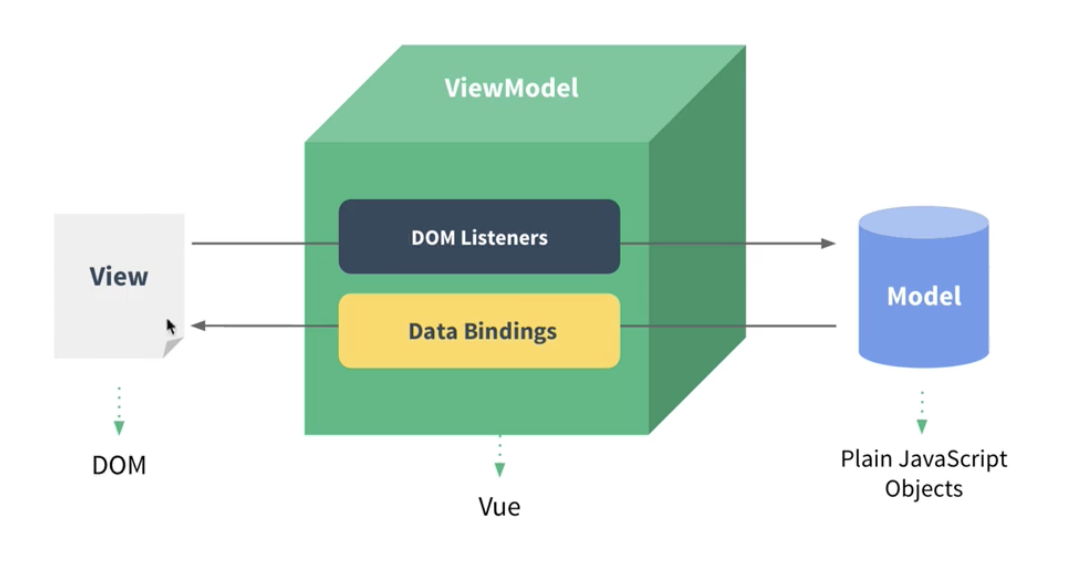
가상돔 이동
주요 개념
reactivity 반응성
데이터 바인딩 감지하는것…그리고그것을화면에적용,,,..
js에서는… 데이터바인딩감지를 다음과같은것으로할수있음.. Object.defineProperty , proxy… 즉시실행함수를 이용하여 스코프 관리
뷰 컴포넌트
컴포넌트 기반으로 관리 - 재사용성
기본 문법
data = react의 state같은거
변화를 감지해서 화면에 렌더링함
인스턴스 생성
let vm = new Vue({
    el: "#app", //인스턴스 그려지는 시작점
    data : {
        message : "hi"
    },
    template:,// 화면에 표시할 요소
    methods:,// 화면의 동작과 이벤트 로직을 제어하는 메서드
    created:,// 마운트전.virtual dom사용 못함. 데이터초기화
    mounted : //마운트 직후 돔접근가능
    watch: , 	//data정의 속성 변화햇을때 추가동작 (useEffect같은거군.)
    components:,//지역컴포넌트 등록
})  // 관습적으로 vm사용
컴포넌트
생성
// 전역 컴포넌트로 등록
Vue.component(
    'app-header',
    {
        template: '<h1></h1>'
    }
)
// 지역컴포넌트 등록방법
new Vue({
    el :"#app",
    components : {
        '컴포넌트 이름' : {컴포넌트 내용}
    }
})

//랜더함수 이용 (루트 컴포넌)
new Vue({
    render : h=> h(App)
}).$mount('#app);

new Vue({
    el :"#app",
    components : {
        'app' : App
    }
})
//위아래 동작은 거의 같음
사용할때는 컴포넌트 등록 이름을 이용하여 사용하면 됨<app-header/>
통신
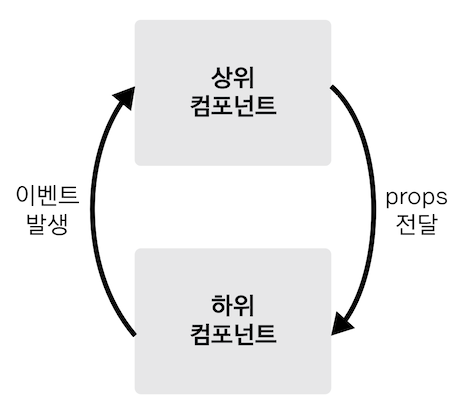
리액트랑 비슷?
속성 문법
props 전달
동적 할당
<tag  v-bind:propsname = "varname"/>
<tag  :propsname = "varname"/>
<tag :name = "{varname : boolean}" /> // 참일때만 varname
//cumputed가 더나음
//위에 두개는 같다.
var tag  = {
    template: '<h1>tag</h1>',
    props : ['propsname']
}
new Vue({
    el :"#app",
    components : {
        'tag' : tag
    },
    data:{
        varname:'varval'
    }
})

//여러개
data:{
    objectOfAttrs:{
        id: 'con',
        class:'wrapper'
    }
}
<div v-bind="objectOfAttrs"></div>
이벤트
//click
var tag  = {
    template: '<button v-on:click="passEvent">click me</button>',
    methods : {
        pathEvent: function(){
            this.$emit('pass',{내보내고싶은값});//내보낸 이벤트 이름
        }
    }
}
new Vue({
    el :"#app",
    components : {
        'tag' : tag
    },
    methods:{
        logText: function(){
            console.log('hi')
        }
    }
})
//tag태그에서 pass이벤트가 발생시  logText함수실행
<tag v-on:pass="logText" />

//단축문법
<tag @[pass]="logText" />

//계산식 사용불가
<a :['foo' + bar]="value>...  </a>//makes error
//computed 사용해야

//수식어
 event.preventDefault 사용대신
 <a @click.prevent="handler"/> 이렇게 사용가능
속성 상속
해당 컴포넌트의 자식 루트 컴포넌트에게 속성이 상속됨
이미 있을 경우 병합
app.component('date-picker', {
  template: `
    <div class="date-picker">
      <input type="datetime">
    </div>
  `
})

<!-- non-prop 속성과 Date-picker 컴포넌트 -->
<date-picker data-status="activated"></date-picker>

<!-- 렌더링된 date-picker 컴포넌트 -->
<div class="date-picker" data-status="activated">
  <input type="datetime">
</div>
상속하기 싫거나 자식 루트 컴포넌트 말고 다른 요소에게 속성을 줄때
<script>
    export default { inheritAttrs: false, };
 </script>
 <template> <p>Non-Prop 속성: {{ $attrs }}</p> </template>
템플릿 문법
데이터바인딩
methods : 화면의 동작과 이벤트 로직을 제어하는 메서드
computed : 반복되고 단순계산을 실행할때 . (data값을 변경시키면안됨.)
종속 대상을 따라 캐싱
getter전
watch : data정의 속성 변화햇을때 추가동작 (useEffect같은거군.무거운 동작)
인자로 새값, 이전값을 받음
데이터패칭 , 디바운싱등..액션을 취함 혹은 돔을 바꿀ㄸ
watchEffect
두개 차이점 : watch는 명시적으로 관찰된 속성 추적
watch effect는 동기 실행중 액세스 되는 모든 반응 속성을 자동으로 추적.
filters :
created : lifecycles관련 속성
스타일을동적 바인딩할때 배열객체로도 받을 수 있다.
<div :style="{ color: activeColor, fontSize: fontSize + 'px' }"></div>

<div :style="[baseStyles, overridingStyles]"></div>
디렉티브
v-어쩌구 형태인
v-bind : 동적바인딩 > :
v-on :이벤트감지 > @
v-if:값 : 참일시실행
v-else : 값이 거짓일시 실
v-else-if : elseif
v-for : 반복문
<li v-for="(item, index) in items" :key="item.id">
  {{ item.message }}
</li>
v-show : 돔에 항상보여줌 거짓일시 CSS display 속성을 none으로
v-model : input 값을 할당함, v-bind와 v-on의 기능의 조합임
v-slot : 리액트의 chidren
<FancyButton>
<!-- 슬롯 콘텐츠 --> Click!!
</FancyButton>

<!-- FancyButton.vue -->
<template>
    <button class="fancy-btn">
        <slot></slot>
    </button>
</template>


<!---랜더링---->
<button class="fancy-btn">
    Click!!
</button>
- 이름을 부여할 수도 있음 default는 태글ㄹ 생략가능
<!-- 부모 컴포넌트 사용 예시 -->
<template>
  <BaseCard>
    <template v-slot:header>제목</template>
    <template v-slot:default>안녕하세요</template>
    <template v-slot:footer>푸터</template>
  </BaseCard>
</template>

<!-- BaseCard.vue -->
<template>
  <article>
    <div>
      <slot name="header"></slot>
    </div>
    <div>
      <slot></slot>
    </div>
    <div">
      <slot name="footer"></slot>
    </div>
  </article>
</template>
라우터
const routes = [ { path: '/', component: HomeView }, { path: '/about', component: AboutView }, ]
//verson 2
var router = new VueRouter({
    routes,
})
new Vue({
    el: '#app',
    router,

})

<div id="app">
    <router-link></router-link>
    <router-link></router-link>
    <router-view></router-view>
</div>
//verson 3
createApp(App) .use(router) .mount('#app')
 const router = createRouter({ history: createMemoryHistory(), routes, })
router-links 는 걍 리액트의 link랑 같네염^^
비동기
js의 비동기 처리 패턴변화
- callback
- promise
- promise + generator
- async & await
vue 세팅
과거
cli 이용하여 세팅
vue init
vue create
현재 (vue v3)
npm create vue@latest
npm init vue@latest
//위의 두개의 명령어는 같다.
과거 vs 현재
- webpack vs vite
- 다양한 플러그인 지원 vs 오직 단순한 스캐풍딩도구(나머진 vite 한테 위임)
React와 차이점, 같은점
데이터흐름 양방향 vs 단방향
장단점
https://gymcoding.notion.site/acf439e5e4b04e079104439153a7f223
https://joshua1988.github.io/vue-camp/
- 검색자료