1_setting
| topics | |
| types | |
| tags |
#android #setup #android-studio #gradle
|
| references |
Android 프로젝트 생성 및 설정
Android Studio에서 프로젝트를 생성하고 기본 설정하는 방법이다.
프로젝트 생성
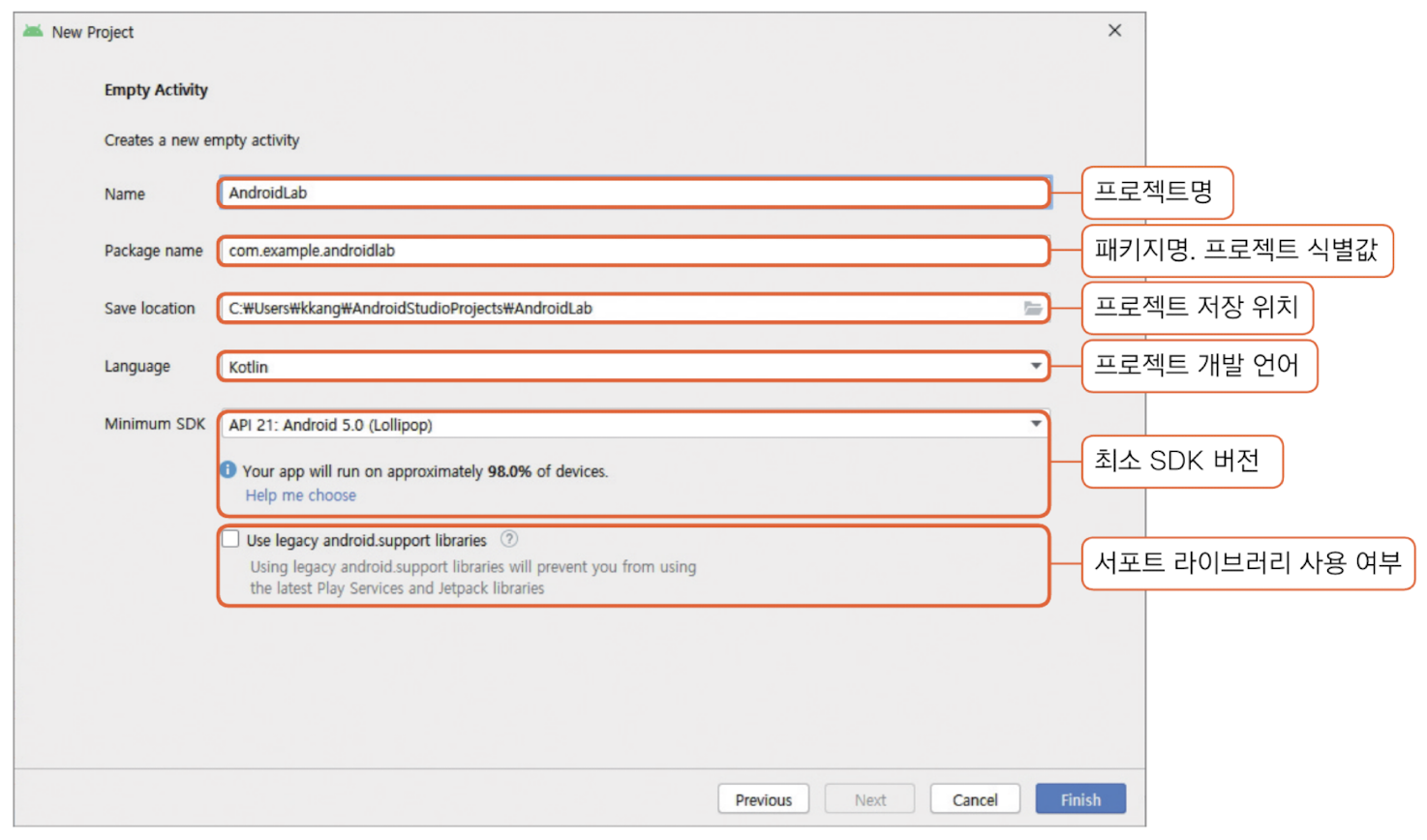
팁: 기존 프로젝트에 모듈을 추가하는 방식으로도 앱을 생성할 수 있다. Android Studio에서는 모듈 == 앱이다.
주요 설정 항목
| 항목 | 설명 |
|---|---|
| Package Name | 앱의 식별값. 보통 도메인 역순 + 프로젝트명 |
| Build Configuration Language | Groovy DSL(.gradle) 또는 Kotlin DSL(.gradle.kts) |
| Minimum SDK | 앱이 지원하는 가장 낮은 안드로이드 버전 |
Build Configuration Language
// Groovy DSL - build.gradle
android {
    compileSdk 34
}

// Kotlin DSL - build.gradle.kts
android {
    compileSdk = 34
}
왜 Kotlin DSL을 쓰냐면: 타입 안전성, IDE 자동완성 지원이 좋다. 하지만 빌드 시간이 조금 더 걸릴 수 있다.
SDK 버전 이해
| 버전 | 설명 |
|---|---|
compileSdk |
컴파일에 사용할 SDK. 최신 버전 권장 |
targetSdk |
앱이 테스트된 최신 안드로이드 버전 |
minSdk |
앱이 지원하는 가장 낮은 버전 |
// android/app/build.gradle.kts
android {
    compileSdk = 34    // 최신 API로 컴파일

    defaultConfig {
        minSdk = 24        // Android 7.0 이상 지원
        targetSdk = 34     // Android 14에서 테스트됨
    }
}
왜 compileSdk는 최신으로 하냐면: 최신 기기를 타겟팅하면서 하위 호환성을 유지할 수 있다. 호환성 테스트를 위해 의도적으로 낮출 때도 있다.
Android SDK 설정
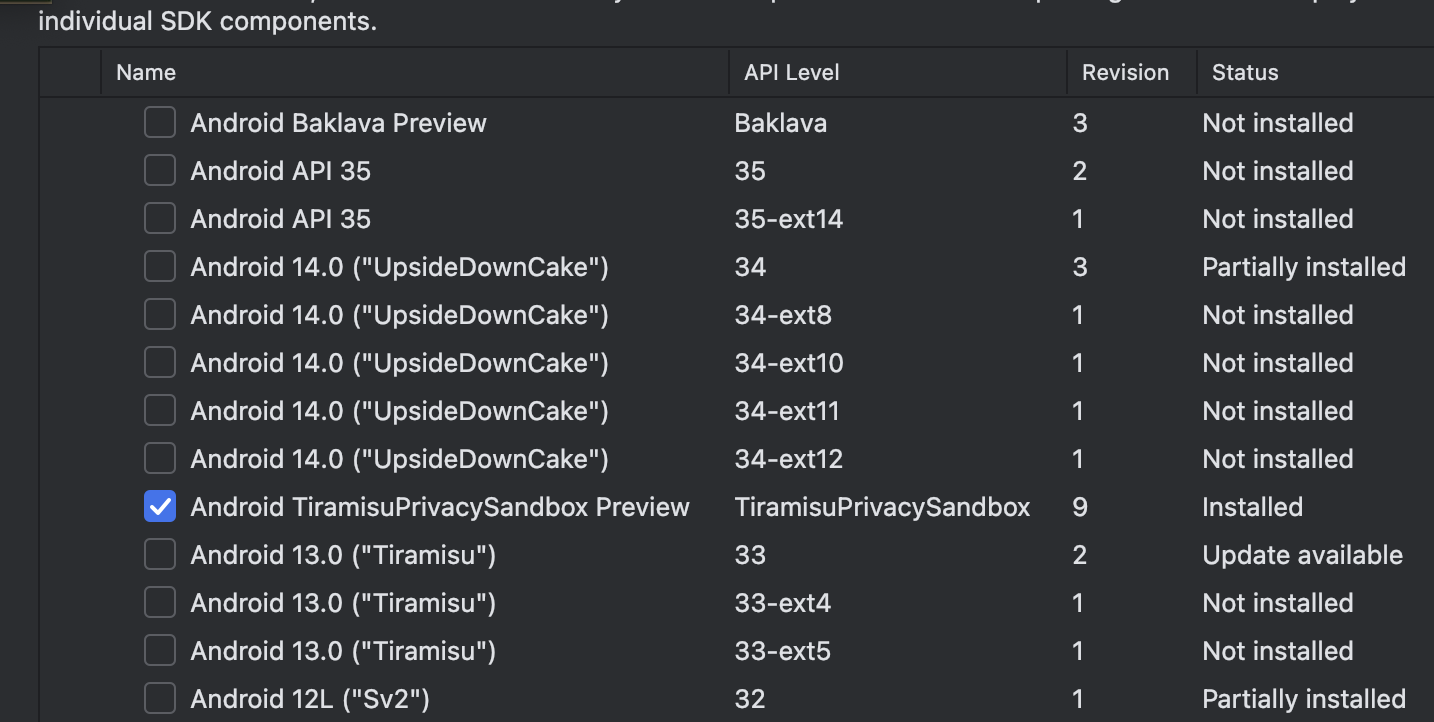
Settings → Languages & Frameworks → Android SDK
SDK Tools
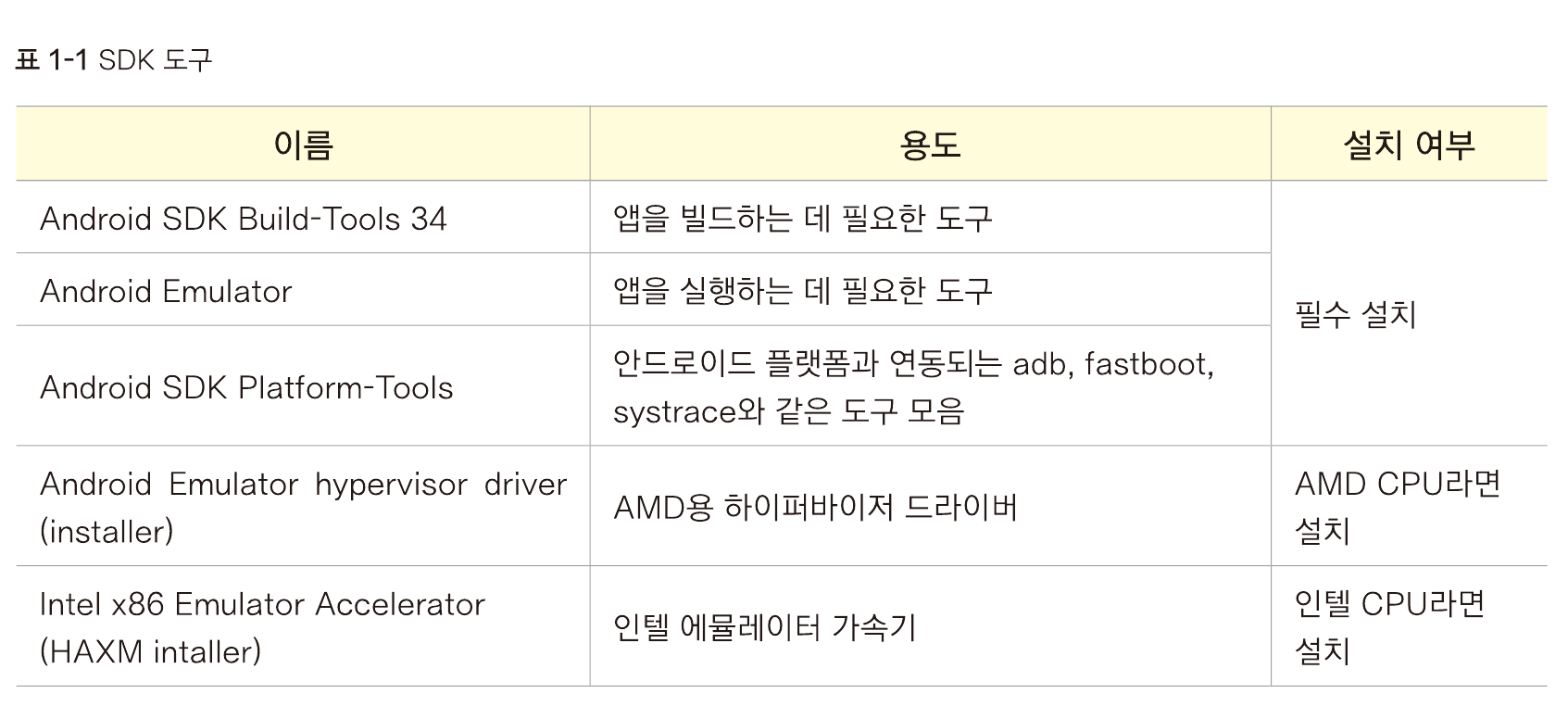
필수 도구:
- Android SDK Build-Tools
- Android SDK Platform-Tools
- Android Emulator
프로젝트 폴더 구조
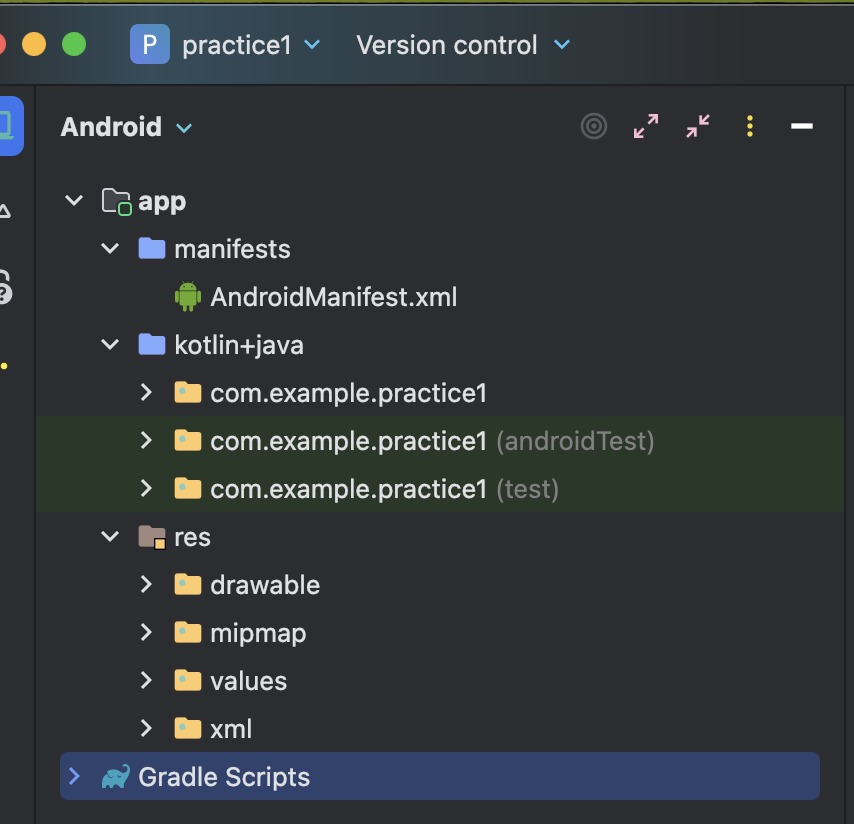
manifests
앱의 기본 설정을 담는 폴더다.
AndroidManifest.xml 구조:
<manifest
    xmlns:android="http://schemas.android.com/apk/res/android"
    xmlns:tools="http://schemas.android.com/tools">

    <application
        android:allowBackup="true"
        android:icon="@mipmap/ic_launcher"
        android:label="@string/app_name"
        android:theme="@style/Theme.AndroidLab">

        <activity
            android:name=".MainActivity"
            android:exported="true">
            <intent-filter>
                <action android:name="android.intent.action.MAIN" />
                <category android:name="android.intent.category.LAUNCHER" />
            </intent-filter>
        </activity>
    </application>
</manifest>
| 태그 | 설명 |
|---|---|
manifest |
루트 태그, 네임스페이스 선언 |
application |
앱 전체 설정 (아이콘, 테마 등) |
activity |
화면 컴포넌트 등록 |
intent-filter |
인텐트 설정 (LAUNCHER = 앱 진입점) |
@머시기/머시기: res 폴더 안에 있는 리소스를 참조하는 문법이다.
kotlin+java
앱의 주요 소스 코드가 들어간다.
res (Resources)
정적 리소스 파일을 저장하는 폴더다.
| 폴더 | 내용 |
|---|---|
drawable |
이미지, 벡터 파일 |
mipmap |
앱 아이콘 (다양한 해상도) |
values |
문자열, 색상, 테마 등 |
xml |
환경설정, 보안, 백업 관련 |
values 폴더 파일들:
strings.xml- 문자열 리소스colors.xml- 색상 정의themes.xml- 앱 테마 스타일dimens.xml- 크기 값styles.xml- 커스텀 스타일
Gradle Scripts
빌드 설정 파일들이다.
| 파일 | 설명 |
|---|---|
build.gradle.kts (Project) |
프로젝트 수준 빌드 설정 |
build.gradle.kts (Module: app) |
모듈(앱) 수준 빌드 설정 |
모듈 레벨 build.gradle.kts 주요 항목:
plugins {
    id("com.android.application")
    id("org.jetbrains.kotlin.android")
}

android {
    namespace = "com.example.myapp"
    compileSdk = 34

    defaultConfig {
        applicationId = "com.example.myapp"  // 앱 식별자
        minSdk = 24
        targetSdk = 34
        versionCode = 1
        versionName = "1.0"
    }

    compileOptions {
        sourceCompatibility = JavaVersion.VERSION_17
        targetCompatibility = JavaVersion.VERSION_17
    }

    kotlinOptions {
        jvmTarget = "17"
    }
}

dependencies {
    implementation("androidx.core:core-ktx:1.12.0")
    implementation("androidx.appcompat:appcompat:1.6.1")
}
관련 문서
- 2_안드로이드 이해 - Android 아키텍처
- 3_코틀린 - Kotlin 기초
- 키스토어 명령어들 - 앱 서명